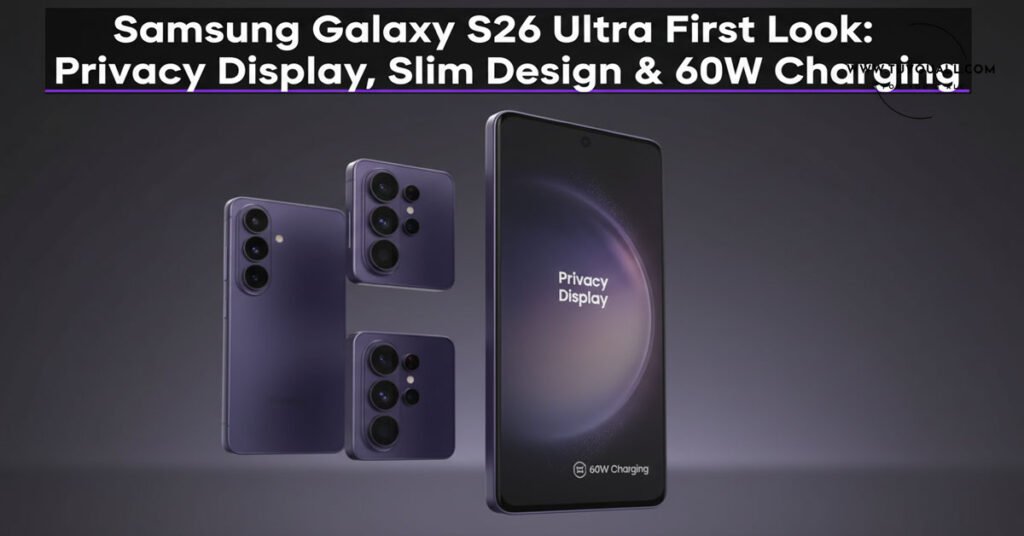
Discover the Samsung Galaxy S26 Ultra’s groundbreaking Privacy Display, slimmer 7.9mm design, 60W charging & Snapdragon 8 Gen 5 in our detailed first impressions.
Have you ever felt that awkward moment when someone peeking over your shoulder reads your private messages on the bus? Or worried about sensitive work emails being visible to the person sitting next to you on a flight? Samsung seems to have heard these everyday frustrations loud and clear. With the launch of the Samsung Galaxy S26 series, the tech giant is introducing what might be the most practical privacy innovation we’ve seen in smartphones in years.
I recently got my hands on the entire S26 lineup—the standard S26, the S26 Plus, and the star of the show, the Galaxy S26 Ultra. While incremental updates are the name of the game in 2026, there’s one feature that genuinely made me say “wow.” Let me walk you through everything that’s new, what surprised me, and what might just change how we think about phone privacy forever.
What’s New in the Galaxy S26 Series?
Samsung launched four devices this time around (yes, four!), including the Galaxy Book 4 Pro alongside the S26, S26 Plus, and S26 Ultra. But today, we’re focusing on the premium lineup that most of you are curious about.
The moment you lift the S26 Ultra out of the box, something feels different. “Oh my god, this feels thin!” I caught myself saying. And it’s not just marketing speak—this is the slimmest and lightest Ultra phone Samsung has ever made.
Design Evolution: Slimmer, Lighter, Rounded
Let’s talk about how this phone feels in your hand because, honestly, that’s where you’ll notice the biggest difference first.
The Shift from Boxy to Rounded
Remember the sharp, boxy edges of the S25 Ultra? Samsung has softened its approach—literally. The S26 Ultra features rounded edges that make it much more comfortable to hold for extended periods.
“Last time in the S25 Ultra, it was slightly boxy,” I noted while comparing both devices side by side. “You can see the edges—yes, they’ve become slightly rounded. Earlier this was sharp.”
For Example: Imagine holding a premium chocolate bar versus a smooth river stone. The S25 Ultra was like that expensive, angular chocolate—premium but sharp. The S26 Ultra is like the river stone—still premium, but naturally fitting into your palm.
Material Change: From Titanium to Armor Aluminium
Here’s a surprising move: Samsung ditched the titanium frame that was a major selling point of the S25 Ultra. Instead, they’ve switched to “Armor Aluminium” for the S26 Ultra frame. While titanium sounds more premium on paper, the new aluminium frame contributes to that lighter weight without compromising durability.
The back remains glass (Gorilla Glass Victus 2), and the device maintains its IP68 water and dust resistance rating.
S Pen Gets Directional
Attention S Pen users—there’s a small but important change. Previously, you could insert the S Pen into the S25 Ultra from any direction. Not anymore.
“This time you have to insert the S Pen from the right direction,” I discovered during my hands-on. Try inserting it the wrong way, and it clearly won’t fit. The phone almost tells you, “Hey, you’ve inserted it wrong.” It’s a minor inconvenience for the sake of better internal component arrangement, but worth noting if you’re used to the carefree insertion of previous models.
The Star Feature: Privacy Display Technology
Now let’s get to the feature that genuinely excited me—the Privacy Display. This isn’t just another software toggle or blue light filter. This is hardware-level privacy protection that could make those privacy screen protectors obsolete.
How Does Privacy Display Work?
In the display settings, search for “Display Privacy” and you’ll find two options:
- Turn On Privacy Display – Instantly blocks side-angle viewing
- Maximum Privacy Protection – Complete side vision blocking (top, bottom, left, right)
But here’s where it gets interesting: “You can customize it according to your needs,” I found. Want privacy only for specific apps? You can set it up for third-party applications individually. Banking app? Maximum privacy. Casual browsing? Standard view. It’s completely customizable.
Hardware, Not Software
“This is basically a hardware feature,” I emphasize. Unlike software solutions that simply dim the screen, this uses display layer technology to physically restrict viewing angles. When activated, anyone trying to peek from beside you sees a darkened, almost black screen.
The Trade-off: When Privacy Display is enabled and you’re consuming content—photos, videos, etc.—the screen appears slightly “faded.” The clarity you get with Privacy Display off isn’t quite there when it’s on. I demonstrated this by showing the same content with the feature on and off—the difference in vibrancy is noticeable when viewed from the front.
Is This a Game-Changer?
“Do you think so—this feature, other brands are going to copy?” I asked during my first look. “I feel tense, brother—all these privacy tempered glass sellers, their business is going to shut down!”
Honestly? This could be huge. If Samsung has perfected this without making the display look terrible in normal use (and from my brief testing, it’s very usable), expect Apple, Google, and others to follow suit within two years.
Bad news, though: This feature is exclusive to the S26 Ultra. The S26 and S26 Plus don’t get it. Should Samsung have included it across the lineup? In my opinion, yes. But that’s product segmentation for you.
Display Quality: Familiar but Excellent
The S26 Ultra sports the same 6.9-inch 2X Dynamic AMOLED display with 120Hz refresh rate as its predecessor. If you’re hoping for radical display changes, there aren’t any—and that’s not necessarily bad.
Key Specifications:
| Feature | Specification |
| Size | 6.9 inches |
| Type | 2X Dynamic AMOLED |
| Refresh Rate | 120Hz adaptive |
| HDR Support | HDR10+ |
| YouTube Playback | 4K 60fps HDR |
The bezels remain symmetrical and narrow. Colors are vibrant, contrast is deep with those inky blacks AMOLED is famous for, and watching HDR content on YouTube is still a visual treat. Sometimes, if it ain’t broke, don’t fix it.
Camera System: Incremental Improvements
The camera setup remains a 200-megapixel quad-camera array on the back and a 12-megapixel selfie shooter up front. But don’t let the megapixel count fool you—there are physical and software changes worth noting.
Physical Camera Changes
Look closely at the camera module, and you’ll spot the differences from the S25 Ultra:
- Camera Rings: The thick, prominent camera rings from the S25 Ultra are gone. Instead, Samsung has integrated a cleaner, flush design where the cameras sit more seamlessly within the module.
- Periscope Lens Redesign: The traditional L-shaped periscope lens arrangement from the S25 Ultra has changed. “This doesn’t have the traditional L-shaped prism,” I observed. “It seems like it could be a W-prism or Samsung’s own All Lens on Prism (ALoP) technology.” I’m still waiting for confirmation from Samsung’s team on the exact technology used, but the physical difference is clear.
Camera Performance: Brighter Telephoto
Samsung claims the telephoto lens is 37% brighter than the previous generation, and Nightography has been improved for brighter low-light shots.
Live Test Comparison (S26 Ultra vs S25 Ultra):
- Both phones set to 5X zoom
- Same lighting conditions
- Same subject
Results: The skin tones on the S26 Ultra appeared slightly better and more natural to my eyes. However, the S25 Ultra’s image looked marginally brighter overall. Details seemed similar, and shutter speed performance was nearly identical.
Important Caveat: These are early tests under embargo conditions. For a comprehensive camera comparison including night mode, portrait mode, and video stabilization, wait for the full unboxing and review.
Camera Features Checklist
- 8K video recording at 30fps (rear camera)
- 4K video at 30fps (front camera)
- Slow Motion & Hyperlapse
- Pro Mode (Photo & Video)
- HDR Video recording
- Photo Assist AI features
Performance and Battery: Speed Meets Efficiency
Processor: Snapdragon 8 Gen 5 for Galaxy
The S26 Ultra is powered by the Qualcomm Snapdragon 8 Gen 5 “for Galaxy”—a customized version specifically optimized for Samsung devices. This is a 2nm chip promising better efficiency and performance.
However, there’s confusion in the lineup:
- S26 Ultra: Snapdragon 8 Gen 5
- S26 & S26 Plus: Exynos 2600 (Samsung’s in-house 2nm chip)
“I don’t understand—on one side there’s Snapdragon chipset, on one side Samsung’s own homegrown chip,” I admitted. This split strategy continues Samsung’s tradition of using different processors for different markets and models.
Memory and Storage
| Variant | RAM | Storage Type |
| Base Model | 12GB | 256GB |
| RAM Type | LPDDR5X Ultra | – |
| Storage | – | UFS 4.1 |
Battery and Charging: Finally Faster!
Here’s welcome news for power users—the S26 Ultra finally bumps up charging speeds:
| Model | Battery Capacity | Charging Speed |
| Galaxy S26 | 4,300 mAh | 45W |
| Galaxy S26 Plus | 4,500 mAh | 45W |
| Galaxy S26 Ultra | 5,000 mAh | 60W |
Yes, the S26 Ultra supports 60W charging, up from 45W on the S25 Ultra. While not the fastest in the Android world (some Chinese flagships offer 120W+), it’s a meaningful upgrade for Samsung users who’ve been stuck at 45W for years.
Software and AI Features
One UI 7 and Galaxy AI
The S26 series ships with One UI 7 based on Android 16, with 7 years of security updates promised. But the bigger story is the Galaxy AI Engine—a combination of on-device AI and Google’s Gemini integration.
Samsung is positioning this as an “AI Phone,” and while that term gets thrown around a lot lately, there are practical implementations:
Audio Eraser: Now Works Everywhere
Previously, Audio Eraser (which removes background noise from videos) was limited to Samsung’s Gallery app. “This time’s Audio Eraser will support third-party apps like Instagram, YouTube, etc.,” I noted. Record a Reel on Instagram and clean up the audio directly—no need to export to Gallery first.
Available Colors
The S26 series comes in four colors (specific color names weren’t detailed in the first look, but expect Samsung’s usual Phantom Black, Cream, Green, and Graphite options with some region-specific variants).
FAQ: Samsung Galaxy S26 Ultra
Q: What makes the Privacy Display different from a privacy screen protector?
A: Unlike stick-on privacy filters, Samsung’s Privacy Display is built into the screen hardware itself. It uses display layer technology to restrict viewing angles without the reduced clarity or peeling issues of physical protectors. Plus, it’s customizable per app.
Q: Is the S26 Ultra really lighter than the S25 Ultra?
A: Yes. At just 7.9mm thick, it’s the slimmest Ultra phone Samsung has made, and the switch from titanium to Armor Aluminium frame contributes to a noticeably lighter in-hand feel.
Q: Why did Samsung remove the titanium frame?
A: While not officially stated, the move to Armor Aluminium likely helps achieve that slimmer, lighter profile while maintaining structural integrity. Titanium, while premium, is denser and heavier.
Q: Can I use the S Pen from my S25 Ultra on the S26 Ultra?
A: Physically, yes, but note that the S26 Ultra requires correct-direction insertion unlike the bidirectional insertion on the S25 Ultra. Functionality remains similar.
Q: Is the Privacy Display available on the regular S26 or S26 Plus?
A: Unfortunately, no. The Privacy Display is exclusive to the S26 Ultra as a premium differentiator.
Q: What’s the charging speed difference between models?
A: The S26 Ultra supports 60W wired charging, while the S26 and S26 Plus remain at 45W. All models support wireless charging and reverse wireless charging.
Final Thoughts: Is the Upgrade Worth It?
After spending initial hands-on time with the Galaxy S26 Ultra, here are my honest first impressions:
The Good:
- That slimmer, lighter design genuinely makes a difference in daily use
- The Privacy Display is innovative, practical, and potentially industry-changing
- 60W charging finally addresses a long-standing user complaint
- Rounded edges improve ergonomics significantly
The Considerations:
- Camera improvements appear incremental (pending full testing)
- Privacy Display slightly reduces screen vibrancy when active
- S Pen insertion is now directional (minor inconvenience)
- Privacy features are Ultra-exclusive, not series-wide
“Overall, if I talk about first impressions—look, I haven’t spent much time yet, so I can’t say much,” I want to be transparent. “But whatever I’ve experienced, two-three things are seriously ‘wow’ in this phone.”
The Samsung Galaxy S26 Ultra isn’t reinventing the smartphone wheel, but it’s refining it in meaningful ways. The Privacy Display alone could justify the upgrade for privacy-conscious professionals, while the slimmer design makes flagship power more comfortable than ever.
What do you think? Does the Privacy Display feature excite you, or are you waiting to see how it performs in real-world daily use? Drop your thoughts in the comments below—I’d love to hear whether you think this is genuine innovation or just another gimmick!
Source & Credit
This blog post is based on insights from Manoj Saru’s YouTube video: “Samsung Galaxy S26 Ultra First Look – Privacy Display, Slim Design & More!”
The original content has been translated, expanded, and repurposed for educational purposes.
Note: Specifications and features mentioned are based on first impression hands-on content. Final retail units may vary. Always check official Samsung specifications before making purchase decisions.